
The Hitchhiker's Guide to the Galaxy (Web Edition)
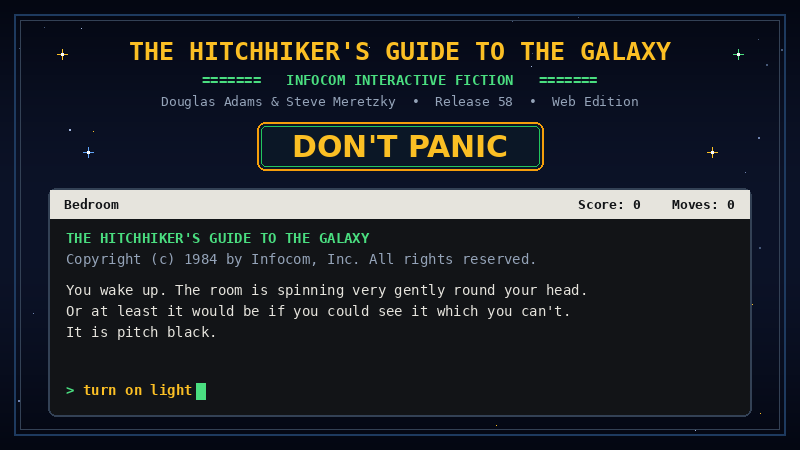
A faithful browser-native edition of Infocom's 1984 interactive fiction classic, co-authored by Douglas Adams and Steve Meretzky—delivered in a distraction-free dark and light reading terminal with instant keyboard entry, persistent cloud save slots, and multi-turn undo.
Story & Gameplay
- DON'T PANIC (Release 58): You wake up in a pitch-black bedroom with a splitting hangover and a very bad morning ahead of you. Explore locations, examine everything carefully, manage your inventory, and untangle Douglas Adams' trademark comic-sci-fi puzzles on your way to 400 points.
- Rich Natural-Language Parser: Speak to the game in plain English imperatives—combine verbs, prepositions, and objects (such as
TURN ON LIGHT,PUT GOWN ON, orEXAMINE POCKET) without guessing rigid two-word codes. - Spoiler-Free Exploration & Verbosity Modes: Every room responds with dry wit and subtle clues. Toggle room description length anytime with
VERBOSE,BRIEF, orSUPERBRIEF, or check your status withSCOREandDIAGNOSE. - Named Cloud Save Slots & Multi-Turn UNDO: Because classic Infocom stories are famously unforgiving, every turn is automatically checkpointed in your personal adventure log. Create named save slots with
SAVE <name>, step back through mistakes withUNDO, or branch freely across multiple attempts. - Instant Onboarding & Private Progress: Choose any handle (2–20 characters) and password to launch immediately with zero email verification. Each account stores its own isolated Z-Machine state, save slots, and scrolling transcript across sessions.
Commands & Terminal Controls
On desktop viewports (≥ 900px), start typing directly inline at the active > prompt—no input box or command buttons clutter the prose, and ArrowUp/ArrowDown cycles through your command history while Ctrl+C/Ctrl+V copy and paste naturally. On mobile viewports, a clean bottom command line submits on keyboard Return.
| Command | Shortcut | Description |
|---|---|---|
| LOOK | L | Describe your current surroundings, visible exits, and nearby objects in full detail. |
| INVENTORY | I | List every item you are currently carrying or wearing. |
| N S E W U D | Full compass words | Move North, South, East, West, Up, or Down (plus NE, NW, SE, SW, IN, OUT). |
| EXAMINE <item> | X <item> | Inspect an object, sign, or pocket closely for hidden details and clues. |
| SAVE <name> | — | Write a named Quetzal snapshot to your cloud save slots (for example, SAVE bed). |
| RESTORE <name> | — | Reload a previously saved slot by name and resume from that exact point. |
| SAVES | — | List all of your saved slots with their score, move count, and timestamp. |
| DELETE <name> | — | Permanently remove one of your named save slots. |
| UNDO | — | Step back to the previous turn using your rolling 25-turn snapshot history. |
| RESTART | — | Reset the current session back to the opening Bedroom scene (your named save slots stay safe). |
| QUIT | Q | Exit the active session cleanly while preserving your pre-quit checkpoint for your next sign-in. |
Useful interpreter commands also work as expected: VERBOSE, BRIEF, SUPERBRIEF, SCORE, DIAGNOSE, WAIT (Z), AGAIN (G), and VERIFY.
Technical Architecture
- Pure-Python Infocom Z-Machine v3 Interpreter & Quetzal Snapshots: Built from scratch for Release 58 (Serial
851002), a pure-Python Z-Machine v3 virtual machine executes opcodes, Z-character text decoding, abbreviation expansion, and dictionary tokenization deterministically, serializing portable Quetzal IFF snapshots (IFhd,CMem/UMem,Stks) for both auto-saves and named slots. - Python 3.12 / FastAPI & SQLite WAL Backend: An authoritative Python 3.12 / FastAPI server inside a self-contained Docker container persists user accounts, sessions, Quetzal checkpoints, up to 25 rolling undo states, and a 300-entry scrolling transcript in transactional SQLite WAL (Write-Ahead Logging).
- Minimalist Dark/Light Web Terminal: The browser client (hitchhiker.mcawesome.org) pairs a high-contrast inverted Infocom status bar with readable centered prose in dark charcoal or warm paper light mode, featuring inline desktop typing with zero command shortcut buttons and selectable scrollback.
- Real-Time WebSocket & Persistent Sessions: Live WebSocket connections exchange 1-second heartbeats with automatic reconnect, while a 30-day persistent
HttpOnlysession cookie restores your exact transcript, room, score, and move counter whenever you return.