
Trade Wars II (The Web BBS Edition)
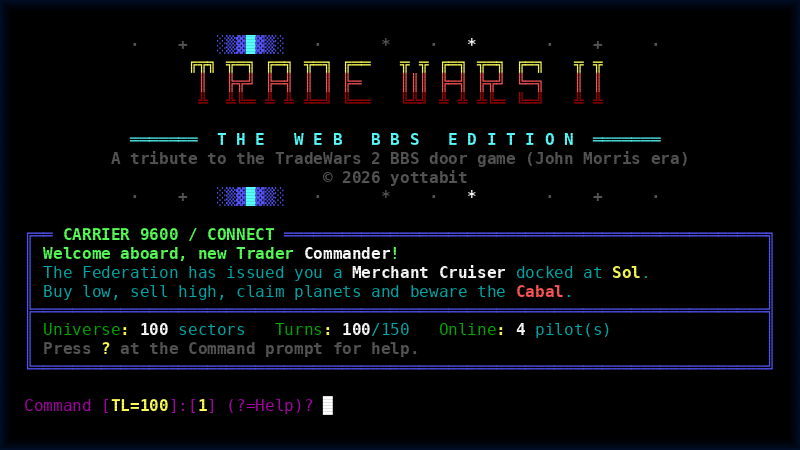
A faithful browser-native tribute to the John Morris era of the classic Trade Wars II dial-up BBS door game—combining authentic 80-column 16-color ANSI/CP437 terminal output, 9600-baud pacing, and a live multiplayer galaxy with modern mobile and desktop ergonomics.
Universe & Gameplay
- 100-Sector Galaxy & FedSpace: A deterministic, strongly connected warp graph (up to 6 warps per sector) anchored at Sector 1 (Sol / Terra). Sectors 1–10 form protected FedSpace where sector fighters, mines, and combat are disabled so new traders can learn the ropes safely.
- Trading Ports & Sol StarDock: Around 55% of sectors outside Sol host Class 1–8 trading ports buying and selling Fuel Ore, Organics, and Equipment (combinations
BBS,BSB,SBB,SSB,SBS,BSS,SSS, andBBB) with dynamic supply-and-demand pricing and automatic restocking. Dock at Sol StarDock (Class 0) in Sector 1 to upgrade cargo holds, fighters, shields, and mines. - Claimable Planets (7 Classes): Roughly 22% of sectors beyond Sol hold planets you can land on, claim, rename, fortify with fighters, and use as vaults for credits and cargo. Every 15-minute world tick, claimed planets produce fresh commodities and fighters based on their class.
- Cabal Patrols, PvP Combat & Escape Pod: Eight roaming Cabal raider patrols prowl outer sectors alongside rival pilots, deployed sector fighters, and sector mines. If your ship is destroyed, your Escape Pod automatically carries you back to Sector 1 (Sol) in a replacement Merchant Cruiser—keeping your credits, planets, and team membership intact (only cargo aboard is lost).
- Teams & Subspace Mail: Create or join an alliance using invite codes, coordinate via persistent subspace mail or sector-wide online hails, and climb the Galactic Rankings by net worth.
- Turn Economy & Instant Onboarding: Pick any available pilot handle (2–20 characters) and password to launch immediately—no email confirmation required. Every new pilot starts docked at Sol in a Merchant Cruiser with 1,000 credits, 20 cargo holds, 15 fighters, 10 shields, and 100 starting turns regenerating +5 turns/hour up to a cap of 150 turns.
Planet Classes & Production per World Tick
| Class | Environment | Fuel Ore | Organics | Equipment | Fighters |
|---|---|---|---|---|---|
M |
Earth type | 4 | 8 | 4 | 3 |
K |
Desert wasteland | 9 | 2 | 3 | 2 |
L |
Mountainous | 7 | 3 | 6 | 3 |
O |
Oceanic | 2 | 10 | 3 | 2 |
H |
Volcanic | 12 | 0 | 4 | 4 |
U |
Gaseous | 3 | 1 | 9 | 2 |
C |
Glacial/Ice | 5 | 2 | 5 | 3 |
BBS Commands & Terminal Controls
On desktop browsers, type single-key BBS commands or destination sector numbers directly into the terminal. On touchscreens and compact viewports, clickable hotkey buttons and an optional command bar mirror every prompt automatically.
| Hotkey | Command | Description |
|---|---|---|
| M | Move / Warp | Warp to an adjacent sector (or type a destination sector number directly). |
| P | Port | Trade Fuel Ore, Organics, and Equipment at a trading port, or upgrade your ship at Sol StarDock (1 turn). |
| D | Display Sector | Re-display the current sector readout, ports, planets, ships, defenses, and warps. |
| L | Land on Planet | Land on a planet in the current sector to claim it, deposit or withdraw cargo/credits/fighters, rename it, or assault hostile defenses. |
| F | Sector Fighters | Deploy fighters to guard the current sector or retrieve your deployed fighters (blocked in FedSpace). |
| K | Sector Mines | Deploy sector mines outside FedSpace to ambush incoming hostile ships. |
| A | Attack | Engage Cabal raiders, enemy sector fighters, or rival traders in combat. |
| S | Scan & Plot Course | Run a long-range scan of adjacent sectors or calculate the shortest warp path to any destination sector. |
| T | Teams & Alliances | Create a team, join an alliance with an invite code, view roster locations, or leave your team. |
| C | Subspace Comm | Send subspace mail to a pilot, read your inbox, or broadcast a live hail to all online traders. |
| W | Who's Online | List every pilot currently carrying a live signal, along with their sector and team. |
| R | Galactic Rankings | Inspect the leaderboard ranked by net worth, kills, deaths, and owned planets. |
| I | Ship & Pilot Info | View ship specifications, turns remaining, next turn countdown, credits, cargo holds, defenses, and sectors explored. |
| H / ? | Help | Display the in-terminal Trade Wars II command reference box. |
| Q | Quit / Log Off | Disconnect cleanly from the BBS (NO CARRIER). |
Status Bar & Display Controls
- Modem Baud Rate: Switch live between 2400 baud, 9600 baud (default), and Instant character pacing.
- CRT Mode: Toggle classic phosphor glow and subtle horizontal CRT scanlines on or off.
- High Contrast (HC) Mode: Switch to a WCAG AAA high-luminance 16-color palette on pure black (available on both the login screen and in-game status bar).
- Collapsible HUD: Toggle the side/drawer Pilot HUD featuring real-time ship telemetry, a color-coded cargo bar, an interactive adjacent-sector warp map, and the online pilot list.
Technical Architecture
- Python 3.12 / FastAPI & SQLite WAL Backend: An authoritative Python 3.12 / FastAPI game server emits pure 80-column ANSI/SGR escape sequences and CP437 box-drawing art, backed by transactional SQLite WAL (Write-Ahead Logging) persistence inside a self-contained Docker container.
- Authentic 80-Column ANSI/CP437 Web Terminal: The browser client (tradewars.mcawesome.org) parses ANSI escapes client-side using the exact IBM PC 16-color VGA palette and bundled
DejaVu Sans Monofonts, keeping terminal scrollback selectable and copyable. - Real-Time Heartbeats & Persistent Sessions: Live WebSocket connections exchange 1-second heartbeats to track online pilot presence; if connectivity drops for more than three consecutive pings, the client flags an offline banner and reconnects automatically. Login sets a 30-day persistent
HttpOnlysession cookie so returning pilots pick up right where they docked.