
The Zork Trilogy (Web Edition)
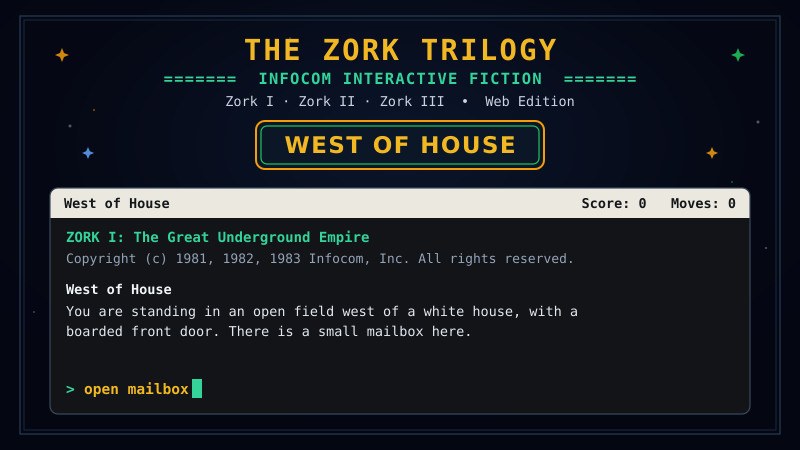
A faithful browser-native edition of Infocom's complete Zork Trilogy—Zork I: The Great Underground Empire, Zork II: The Wizard of Frobozz, and Zork III: The Dungeon Master—delivered in a distraction-free dark and light reading terminal with instant trilogy switching, per-game cloud save slots, and multi-turn undo.
Story & Gameplay
- Zork I: The Great Underground Empire (Release 119 • 350 pts): Stand west of a white house with a boarded front door, open the small mailbox, and descend into the sprawling subterranean ruins of the Great Underground Empire to outwit grues, trolls, and thieves on your quest for all twenty treasures.
- Zork II: The Wizard of Frobozz (Release 63 • 400 pts): Continue deeper into a whimsical realm ruled by the erratic Wizard of Frobozz. Master arcane wands, solve intricate mechanical and magical puzzles, and collect treasures to appease the Demon.
- Zork III: The Dungeon Master (Release 25 • 7 pts): Face the trilogy's philosophical finale in the deep caverns. Rather than amassing treasure, earn up to 7 points by demonstrating wisdom, courage, and compassion to claim your place as the Dungeon Master's successor.
- Instant Trilogy Switching & Isolated Progress: Hop freely between Zork I, Zork II, and Zork III anytime via the header switcher or directly from the prompt with
GAMESandGAME <1|2|3>. Each game maintains its own independent auto-save state, save slots, 25-turn undo stack, and scrolling transcript. - Instant Onboarding & Named Cloud Saves: Choose any handle (2–20 characters) and password to start playing immediately with zero email verification. Create named Quetzal checkpoints with
SAVE <name>, step back through mistakes withUNDO, and resume exactly where you left off across devices.
Commands & Terminal Controls
On desktop viewports (≥ 900px), start typing directly inline at the active > prompt—no input box clutters the prose, and ArrowUp/ArrowDown cycles through your command history while Ctrl+C/Ctrl+V copy and paste naturally. On mobile viewports, a clean bottom command line submits on keyboard Return.
| Command | Shortcut | Description |
|---|---|---|
| LOOK | L | Describe your current location, exits, and nearby items in full detail. |
| INVENTORY | I | List every item you are currently carrying. |
| N S E W U D | Full compass words | Move North, South, East, West, Up, or Down (plus NE, NW, SE, SW, IN, OUT). |
| EXAMINE <item> | X <item> | Inspect an object, inscription, or container closely for clues. |
| GAMES | — | List all three titles in The Zork Trilogy and highlight your active game. |
| GAME <1|2|3> | zork1 / zork2 / zork3 |
Auto-save your current session and switch directly to Zork I, Zork II, or Zork III. |
| SAVE <name> | — | Write a named Quetzal snapshot to the current game's cloud save slots (for example, SAVE house). |
| RESTORE <name> | — | Reload a previously saved slot for the current game and resume from that exact state. |
| SAVES | — | List all saved slots for the active game with their score, move count, and timestamp. |
| DELETE <name> | — | Permanently remove one of your named save slots from the active game. |
| UNDO | — | Step back to the previous turn using the active game's rolling 25-turn snapshot history. |
| RESTART | — | Reset the current game back to its opening scene (your named save slots and other trilogy games stay safe). |
| QUIT | Q | Exit the active session cleanly while preserving your pre-quit checkpoint for your next sign-in. |
Classic Infocom meta commands also work as expected: VERBOSE, BRIEF, SUPERBRIEF, SCORE, DIAGNOSE, WAIT (Z), AGAIN (G), VERSION, and $VERIFY.
Technical Architecture
- MIT-Licensed Z-Machine v3 Story Files & Pure-Python VM: Executes the official MIT-licensed
historicalsourcecompiled Z-Machine v3 story files—zork1.z3(Release 119, Serial880429),zork2.z3(Release 63, Serial860811), andzork3.z3(Release 25, Serial860811)—on a deterministic pure-Python Z-Machine v3 virtual machine with portable Quetzal IFF snapshots (IFhd,CMem/UMem,Stks). - Python 3.12 / FastAPI & SQLite WAL Per-Game Isolation: An authoritative Python 3.12 / FastAPI server inside a self-contained Docker container persists user accounts, sessions, and strictly isolated per-user, per-game
active_gamescheckpoints, namedsave_slots, 25-turnundo_history, and 300-entrytranscriptlogs in transactional SQLite WAL (Write-Ahead Logging). - Minimalist Dark/Light Web Terminal: The browser client (zork.mcawesome.org) pairs a header trilogy switcher and inverted Infocom status bar with readable centered prose in dark charcoal or warm paper light mode, supporting inline desktop typing and selectable scrollback.
- Real-Time WebSocket & Persistent Sessions: Live WebSocket connections exchange 1-second heartbeats with automatic reconnect and instant
switch_gamestate transitions, while a 30-day persistentHttpOnlysession cookie restores your last played game, transcript, room, score, and move counter whenever you return.